DOM(1)节点层次总结
DOM(文档对象模型)为访问和操作网页内容提供了方法和接口。98年DOM1规范建立,比js要晚3年。DOM将HTML文档描绘成一个由多层节点构成的结构,节点又分成了12种,但这12种都继承自一个基类型,所有拥有一些共享的基本方法和属性。)
浏览器渲染页面的第一步就是将HTML文档解析为DOM tree,也就是一个层次结构。其中,文档节点(document类型)是每个文档的根节点,它只有一个子节点,即html元素,称之为文档元素。文档元素是文档的最外层元素,文档的其他元素都包含在其中。这个文档元素也是唯一的。下面我主要总结一下12种节点的基类型node类型,以及3种常用到的节点类型:document,element和text。
1.node类型。着重强调node的属性和方法是12种节点类型所共有的。
node类型所具有的查询属性有:1)nodeType -- 用来确定节点的类型。其中document为9,element为1,text为3。2)nodeName和nodeValue -- 用来了解节点的具体信息。其中document的nodeName为“#document”,nodeValue为null;element的nodeName为元素的标签名,nodeValue为null;text的nodeName为“#text”,nodeValue为节点所包含的文本。
node类型的节点关系涉及到的方法和属性有:1)childNodes -- 查询方式两种:
                    1-- var firstChild = someNode.childNodes[0];  //推荐
                    2-- var secondChild = someNode.childNodes.item(1);
childNodes也具有length属性。2)父节点对子节点具有firstChild,lastChild属性。3)同胞节点间具有nextSibling,previousSibling属性。
node类型的操作方法有:1)appendChild(要插的) -- 末尾添加。2)insertBefore(要插的,插哪前面)。3) replaceChild(要插的,要替换的)。4)removeChild(要删除的)
node类型还有两个方法:1)cloneNode()-- 建立副本,要通过操作方法展示到页面上。2)normalize()处理text类型用的。
2.document类型。
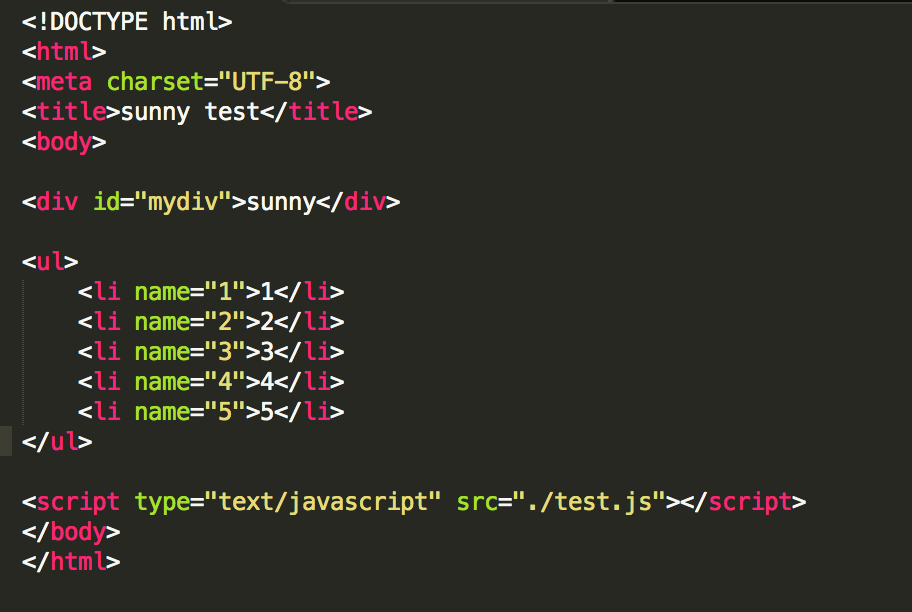
                    //1. document所提供的属性

                    //1) document.documentElement
                    //用node类型的childNodes来访问html元素
                    var html1 = document.childNodes[1];
                    console.log(html1);
                    //用document的documentElement更快更直接
                    var html2 = document.documentElement;
                    console.log( html1 === document.documentElement);

                    //推荐用documentElement的原因是如果html文档中有
                    //那么不同浏览器下childNodes[0]或者firstChild不一定是html了

                    //2) document.body
                    var body = document.body;
                    console.log(body);

                    //3) document.URL and title and domain and referrer
                    console.log( document.URL );
                    console.log( document.title );
                    console.log( document.domain );
                    console.log( document.referrer );

                    //2. document所提供的函数

                    //1) document.getElementById()和getElementsByTagName()
                    var div = document.getElementById("mydiv");
                    console.log(div.nodeName.toLowerCase());

                    var li = document.getElementsByTagName("li");
                    console.log(li);
                    console.log(li.namedItem("4"));

                    //3) HTMLDocment类型所特有的 getElementsByName()
                    var li5 = document.getElementsByName("5");
                    console.log(li5);
3.element类型。
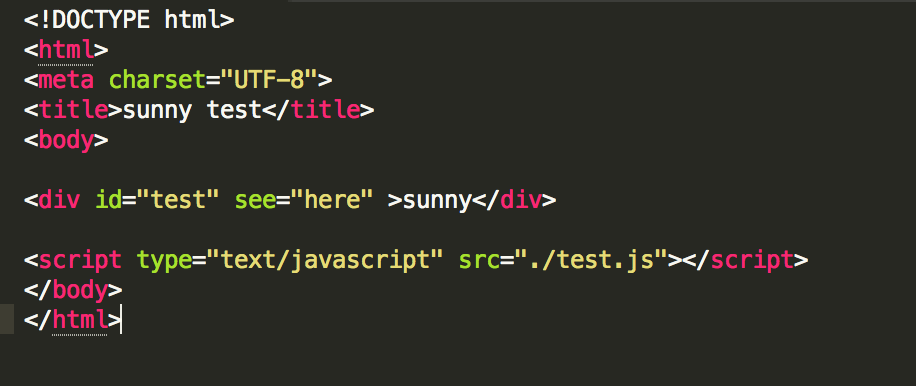
                    //1. element所提供的属性

                    //1) tagName
                    // node提供了nodeName属性可以查tagName
                    // element提供了tagName属性来查tagName
                    var div1 = document.getElementById("test");
                    console.log( div1.nodeName );
                    console.log( div1.tagName ); //推荐

                    //2)一些标准特性属性 id、className、title、lang、dir


                    //2. element提供的方法

                    //1) getAttribute() 重要的是他可以获取自定义的特性
                    var div2 = document.getElementById("test");
                    console.log( div2.getAttribute("id") );  //test
                    console.log( div2.getAttribute("see") );  //here
                    console.log(div2.id ); //test
                    console.log(div2.see ); //undefined


                    //2) setAttribute()
                    div2.setAttribute("id" , "mytest");
                    console.log( div2.getAttribute("id") ); //mytest
                    div2.id = "mytestagain";
                    console.log(div2.id ); //mytestagain


                    div2.setAttribute("see" , "no");
                    console.log( div2.getAttribute("see") );  //no
                    div2.see = "noagain";
                    console.log(div2.see ); //see在页面上还是no

                    //总结下就是---自定义特性要用getAttribute()和setAttribute()来获取
                    //3) removeAttribute()

                    //4) createElement() 创建元素方法,它是document类型的方法
                    var newdiv = document.createElement("div");
                    newdiv.id = "newDiv";
                    newdiv.className = "newDiv";
                    document.body.appendChild(newdiv);
4.text类型。
                    //text类型提供的方法
                    //createTextNode() splitText()

                    var insertDiv = document.createElement("div");
                    insertDiv.id = "newdiv";
                    insertDiv.className = "newdiv";
                    var newText = document.createTextNode("here is new!");
                    insertDiv.appendChild(newText);

                    //找到logo元素,插到它前面
                    var logo = document.getElementById("logo");
                    document.body.insertBefore( insertDiv, logo)